



✦•······················•✦•······················•✦
Playing as a Guest? Make sure to bind your account to keep your progress safe and access it on any device.
How to Bind Your Account
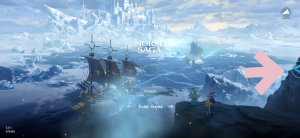
Step 1: On the title screen, tap PlayPark icon in the right corner.
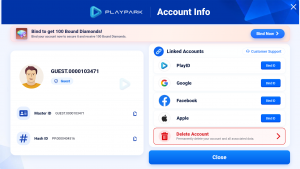
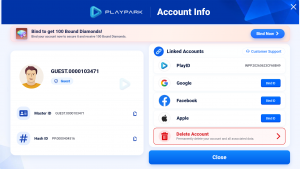
Step 2: The Account Info page will open. Under Linked Accounts, tap Bind ID next to your preferred login method (PlayID, Google, Facebook, or Apple).
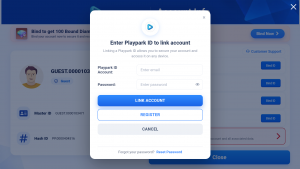
Step 3: Enter your Playpark ID (email) and password, then tap Link Account.
Don’t have an account yet? Tap Register to create one.
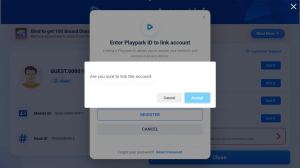
Step 4: A confirmation prompt will appear. Verify the account email shown, then tap Accept to confirm.
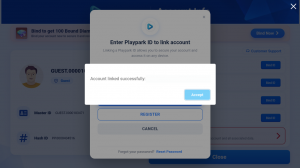
Step 5: You will see a success message: “Account linked successfully.” Tap Accept to close.
Step 6: Done! Your Account Info will now display your linked PlayID. Your account is secured and your progress is saved.
💡 Why Bind Your Account?
- Secure your progress — Guest accounts are not permanently saved by the system.
- Access your account across multiple devices.
- Receive 100 Bound Diamonds as a reward for linking!
- Required to be eligible for CBT event rewards at Official Launch (OBT).
Should you encounter any issues, please contact Support for assistance.
✦•······················•✦•······················•✦
ᛝ Norse Saga Official Channels ᛝ
Facebook: Norse Saga By PlayPark
Facebook Group: Norse Saga Official Group
✦•······················•✦•······················•✦
Norse Saga – A Journey Beyond Myth with Your Companions.
Magic Awaits!