



✦•······················•✦•······················•✦
Topping up or purchasing packages in Norse Saga is quick and easy once you know the steps. This guide will walk you through the entire process, from accessing the Webshop to claiming your purchased items in-game.
Step-by-Step Top-Up Guide
Step 1: Access the Norse Saga Webshop
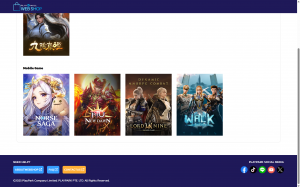
Open your browser and visit the PlayPark Service Refill page: https://secure2.playpark.com/playparkservicerefill/gamelist.aspx
From the list of available games, click Norse Saga. You will be redirected to the official Norse Saga Webshop.
Step 2: Prepare Your Game UID
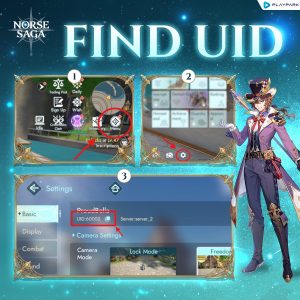
Before you proceed, you’ll need your Game UID — a unique ID linked to your account. Don’t know your UID? Find it in-game:
- Log in to your Norse Saga account.
- Open the Menu, then tap the Settings icon (⚙).
- Your UID will be displayed at the top of the Settings page.
- Copy the UID and return to the Webshop.
Step 3: Verify Your Account
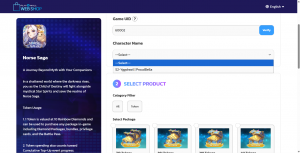
- Paste your UID into the Webshop input field.
- Click Verify.
- Once verified, your account and character details will be displayed.
- From the dropdown menu, select the server and character where you want your top-up to be delivered.
Step 4: Select Your Package
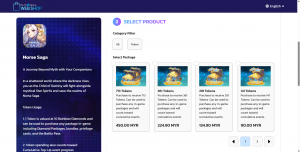
Browse the available packages and choose the one you’d like to purchase. Packages may include Tokens, resource packs, or special limited-time offers.
Step 5: Choose Your Payment Method
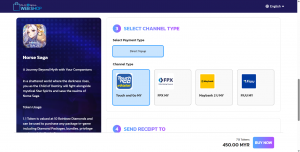
Select your preferred payment option to continue.
Step 6: Confirm and Complete Your Payment
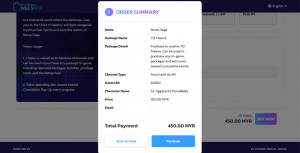
- Review your chosen package and payment option.
- Confirm your purchase — an Order Summary will appear.
- Complete the payment using your selected method to finalize the transaction.
Step 7: Claim Your Items In-Game
Once your purchase is successful:
- Log in to your Norse Saga account.
- Go to your in-game Mailbox to claim your items.
🎉 Congratulations! You’ve successfully purchased and claimed your items. Enjoy your new resources and make the most of your Norse Saga journey!
💡 Pro Tip
Always double-check your UID and server/character selection before confirming payment to ensure your items are delivered to the correct account.
Should you encounter any issues, please contact Support for assistance.
✦•······················•✦•······················•✦
ᛝ Norse Saga Official Channels ᛝ
Facebook: Norse Saga By PlayPark
Facebook Group: Norse Saga Official Group
✦•······················•✦•······················•✦
Norse Saga – A Journey Beyond Myth with Your Companions.
Magic Awaits!